


A free domain is one of the most prominent features Bluehost advertises, and it genuinely is included with qualifying hosting plans. But like most “free” offers in hosting, there are conditions that determine whether you actually qualify, how long the free period lasts, and what happens afterward. This guide covers all of that clearly so you know what you are getting before you sign up.
Which Plans Include a Free Domain?

The free domain offer is included with Bluehost’s shared hosting and WordPress hosting plans purchased on an annual or multi-year term. Specifically, you need to purchase a 12-month or 36-month hosting plan to qualify.
Monthly billing plans do not include a free domain. If you purchase month-to-month hosting, you will need to pay for domain registration separately.

Which Domain Extensions Are Eligible?
Not every domain extension qualifies for the free offer. The following TLDs are eligible:
.com, .net, .org, .biz, .info, .co, .blog, .online, .site, .store, .tech, .website, .space, .uk, .co.uk, .us, .eu, .de, .nl
Premium domains are excluded regardless of their extension. If the domain you want is classified as a premium domain, which typically means it was previously registered and is being resold at a higher price, the free offer does not apply, and you will be shown the premium price during your search.
If you are considering a .us, .ca, or .uk domain, note that these extensions do not support standard WHOIS privacy protection. For .uk domains specifically, any privacy-related changes require manual handling by Bluehost support, which they provide at no extra cost.
How to Claim Your Free Domain
There are two ways the free domain voucher reaches you, depending on how you complete your signup.
Option 1: Claimed During Checkout
This is the most straightforward path. When you select a hosting plan and choose a domain during the same checkout session, the free domain voucher is applied automatically without you needing to enter any code.
You will see the domain price reduced to zero in the cart before you complete payment.
Here is the step-by-step process:
- Go to bluehost.com and navigate to the Hosting tab in the top menu
- Select the hosting type that suits your needs, such as Web Hosting or WordPress Hosting
- Click View Plans and choose your plan
- At the domain selection step, search for your preferred domain name
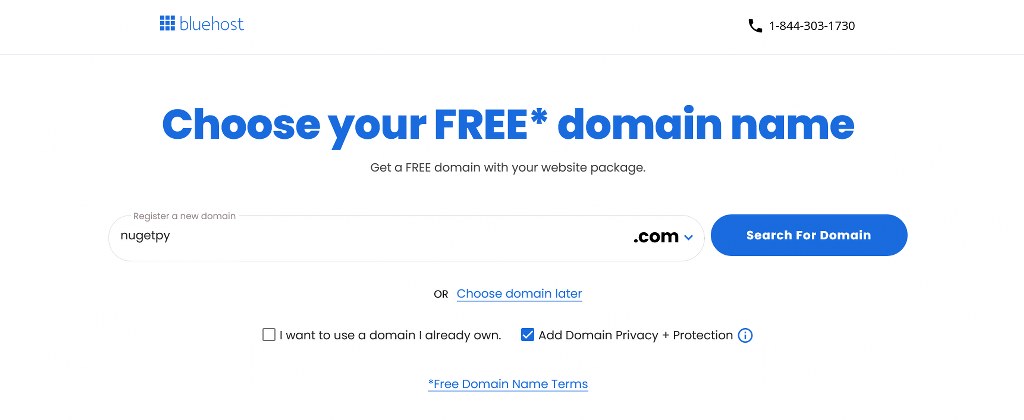
- If the domain is available and eligible, it will be added to your cart at no charge
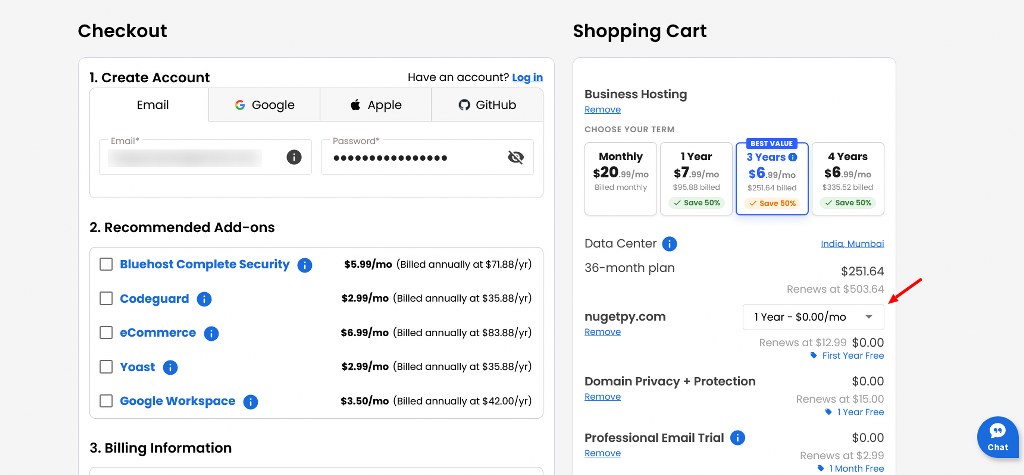
- Complete checkout with your billing information


Option 2: Claimed After Signup via Email Voucher
If you purchase a qualifying hosting plan but skip the domain selection step during checkout, Bluehost sends a free domain voucher to your registered email address.
You can use this voucher to register a new domain or transfer an existing domain to Bluehost at no cost for the first year.
To redeem a voucher received by email:
- Log in to your Bluehost Portal
- Navigate to the Domains tab or the Marketplace section
- Search for the domain you want to register or initiate a transfer
- During checkout, enter the promo code from your voucher email
- Complete the transaction
If you skipped the domain step during signup and did not receive a voucher email, contact Bluehost support directly.
Accounts that have not yet claimed a free domain typically show a temporary domain in the format abc.xyz.mybluehost.me, and support can help you claim what you are entitled to.
Important: The free domain voucher must be redeemed within 90 days of your hosting plan purchase. After 90 days, the voucher expires and the free domain offer is forfeited. Mark your calendar if you plan to claim the domain after signup rather than at checkout.
What Happens After the First Year
The free domain covers registration costs for the first year only. After that, the domain renews at Bluehost’s standard renewal rate for the chosen extension. The renewal rate varies by TLD and is displayed during the domain selection step so you know what to expect before committing.
Auto-renewal is enabled by default on domain registrations. You can manage this setting in your Bluehost Portal under the Domains section. If you want to control renewals manually, disable auto-renew and set a calendar reminder ahead of the expiration date.
What Happens to the Domain If You Cancel Hosting
This is the detail most people miss, and it matters.
If you cancel your hosting plan within the 30-day money-back guarantee window, Bluehost deducts a domain registration fee from your refund to cover the cost of the domain that was registered. The domain itself remains yours for the full registration year. You keep ownership and can transfer it to another registrar after the standard 60-day transfer lock period has passed.
This means the refund you receive will be the hosting fee minus the domain cost, not the full hosting amount. If you are signing up primarily to test Bluehost and plan to cancel, factor in that the domain registration fee is non-refundable.
Additionally, domains cannot be transferred to another registrar within the first 60 days of registration. This is an ICANN policy that applies universally, not a Bluehost-specific restriction.

Choosing the Right Domain Name
The domain you claim with your hosting plan will be your website’s address for as long as you keep it registered. A poor choice here is difficult and costly to fix later.
- Keep it short and easy to spell. Shorter domains are easier to type, easier to share verbally, and less prone to typos. If someone cannot spell it after hearing it once, it is probably too complex.
- Match your brand name where possible. Consistency between your domain, your business name, and your social media handles reduces confusion and reinforces recognition across every channel. If your exact brand name is not available as a .com, check the eligible alternative TLDs before settling for a hyphenated or modified version.
- Avoid hyphens and numbers. Both create friction when sharing a domain verbally. A hyphen is easy to forget, and numbers introduce ambiguity between the digit and the word.
- Check social media handle availability at the same time. Securing a consistent name across your domain and primary platforms from day one is far easier than trying to align them months later when handles may already be taken.
- Avoid trading on someone else’s brand. A domain that closely resembles an existing trademark can create legal problems that far outweigh the short-term convenience of a recognizable name.

