


In this digital age, choosing the right European VPS hosting is a big deal for remote teams. This article shows you how to select a European VPS for remote teams that need low delay and strict GDPR rules.
You’ll learn how server resources and NVMe storage shape speed and stability. We also explain how KVM, your virtual environment, and your RDP server fit into your setup.
Remote teams rely on VPS infrastructure that delivers stable connectivity and predictable performance across regions. The comparison table below highlights European VPS hosting providers that support collaborative workflows with reliable uptime and flexible resources. These providers offer datacenter locations and network performance suited for distributed work environments. Explore our recommended VPS hosting options.
European VPS Hosting Providers Ideal for Distributed Teams
| Provider | User Rating | Recommended For | |
|---|---|---|---|
 | 4.8 | Scalability | Visit Kamatera |
 | 4.6 | Affordability | Visit Hostinger |
 | 4.7 | Developers | Visit IONOS |
Understanding the Strategic Value of a Europe VPS
A European VPS can do more than just host your site. It can boost speed for European users and give your business a stronger local presence.
Why Location Matters: The Central Europe Advantage
Geography plays a massive role in server performance. When your team collaborates across borders, every millisecond counts.
- Latency Targets: For real-time teamwork, aim for sub-50 ms latency on your European VPS. That keeps video calls, file sync, and remote desktop services smooth. Once you creep past 100 ms, you and your team will feel the lag. So, low latency in VPS hosting in Europe really matters.
- Key Hubs: Frankfurt and Amsterdam sit at the heart of central Europe and host DE-CIX and AMS-IX. Putting your VPS hosting there means traffic jumps through fewer EU data centers and network hops.
- Market Entry: Choosing a VPS provider in this region shows EU users you respect local rules. It also means you want reliable performance close to them.

Navigating GDPR and Data Sovereignty
The General Data Protection Regulation isn’t just legal paperwork. It’s a fundamental requirement for operating in Europe.
Compliance
Host your virtual private server in approved EU countries. This helps you follow GDPR rules that began in May 2018. VPS hosting providers should give data terms and advanced security measures.
Legal Protections
Moving data outside the EU is risky. CJEU 2020 rulings tightened these rules. Plus, fines can reach 4% of global turnover or €20 million, whichever is higher.
Data Residency
Regions such as Azure Germany Central use a data trustee model. This model keeps data in a data center. Your Europe VPS host should offer similar reliable infrastructure.
Dedicated Server vs. VPS: Finding the Right Balance
Understanding the difference helps you allocate budget wisely.
A virtual server uses virtualization to split physical hardware into isolated VPS instances. You get dedicated CPU RAM at a fraction of the cost of a dedicated server.
Performance
VPS servers give more stable performance than shared hosting. This is because your resources are not shared with hundreds of sites. They are still better suited to lighter workloads than a physical server. For most remote teams, this balance is enough power without extra waste.
Cost Efficiency
You get full root access and control, like on a Linux VPS. Plus, you won’t have to deal with the cost and upkeep of a dedicated server. Want more detail? Check out our VPS vs. dedicated server analysis.
Critical Technical Criteria: How to Select European VPS for Remote Teams
Picking a European VPS for a remote team is about more than price. You need the right tech basics in place so everyone can work fast, safely, and without downtime.
Ensuring Low Latency for Global Collaboration

Latency determines whether your remote desktop services feel snappy or sluggish.
When you think about how to select a European VPS for remote teams, start with where your users are. London suits UK teams, while Zurich fits DACH users and keeps routes short.
Choose VPS servers from a hosting provider that peers at major internet exchanges. These exchanges include LINX in London and AMS-IX in Amsterdam. Fewer hops plus reliable uptime keep your sessions smooth.
The result? A 20 ms latency drop can fix laggy remote desktops. It also smooths database queries into a seamless, click-and-go experience.
Hardware Requirements: NVMe and Modern CPUs
Your VPS hosting provider’s hardware choices affect everything from page load times to application responsiveness.
- Storage: Choose NVMe SSD storage instead of SATA drives. NVMe gives far higher IOPS. This way, your e-commerce carts, hosting websites, and WordPress shops stay fast. This speed is beneficial during database-heavy operations when many users hit the database at once.
- Processing Power: Pick modern CPUs like AMD EPYC or Intel Xeon Gold at 3.1 GHz or more. That computing power handles complex workloads. It also supports hardware-level encryption for sensitive data.
- Resource Scaling: Start with 2–4 vCPU and 4–8 GB RAM for most VPS plans. As traffic and multiple sites grow on the same server, you can scale resources to 12–16 GB RAM. The best part? You won’t have to move to new hardware.
Choosing the Right Operating System and Virtualization
Virtualization technology determines what you can run and how efficiently.
With KVM virtualization, you get full virtualization and a private kernel. This means each VM stays isolated. LXC shares the host kernel, so it is lighter and faster but less flexible.
Hosts like Serverspace let you deploy a Unix or Windows server in a 1-minute server deployment. This makes your operating system choice simple. Linux environments run web apps, while Windows VPS fits .NET and similar tools.

Running containers and microservices? Choose KVM. Docker works best with it.
Virtualization Comparison Table
| Feature | KVM | LXC |
| Isolation | Full (Private Kernel) | Lightweight (Shared Kernel) |
| Docker Support | Yes | No |
| Nested Virtualization | Yes | No |
| OS Flexibility | Linux & Windows | Linux Only |
The Importance of Full Root Access
Control matters when you’re building custom environments.
Full root access gives you full control of your VPS. You can install custom software and tighten firewall rules instead of using only the host’s defaults.
Teams and small business sites can tune server resources. They can also create a custom virtual environment to match their apps.
It’s standard on most unmanaged VPS plans from YouStable and Serverspace. However, some optional managed services limit it, so ask technical support first.

Ultahost
Management and Support Options
When things break, you don’t want to fix everything alone. The right management and support options make your VPS easier to run and safer to trust.
Managed Support vs. Unmanaged Hosting
Your team’s technical expertise determines which path makes sense. You can choose between managed vs. unmanaged VPS options.
Managed Services
You get patching, monitoring, automated backups, and security hardening. All these services will be handled for you.
This managed support suits teams without Linux skills. It’s also great for teams that want to focus on business, not servers. The support team tunes firewall rules and performance so your apps stay stable.
Unmanaged
You pay less, but you do the work. You set up the OS, install tools, and react fast to cyber threats. The savings count if everything is configured properly.
Provider Examples: YouStable offers fully managed security stacks with phone support. Serverspace gives you a simple control panel to run multiple websites with less hands-on sysadmin work.
Evaluating DDoS Protection and Security Standards
Cyber threats don’t take holidays, and neither should your defenses.
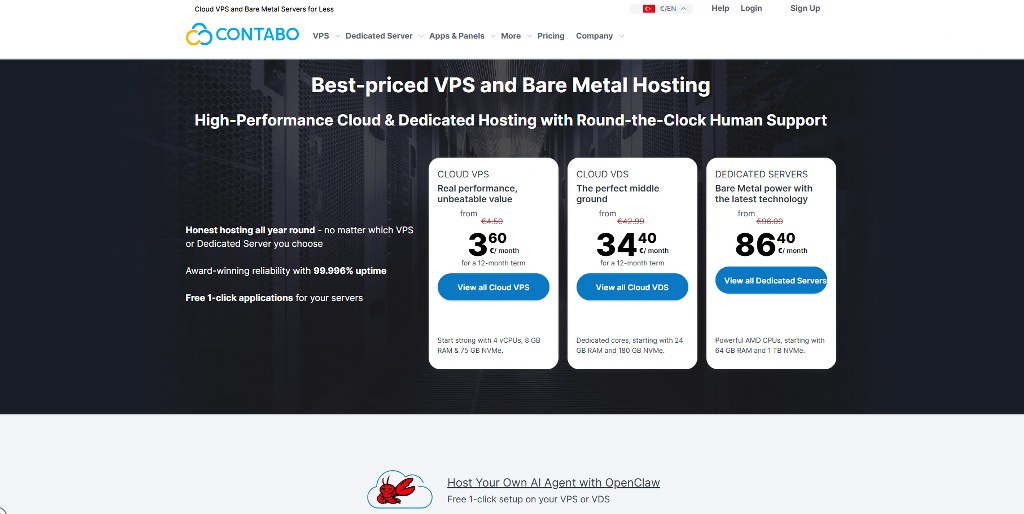
- Standard Protection: When you choose VPS hosting, make sure DDoS protection is included. This is necessary when keeping your apps online. Hetzner and Contabo add it for free and block attacks at the network edge before they hit your server.
- Advanced Security Measures: Look for WAF and multi-factor authentication on the control panel. Features like private networking and security audits help lock things down.
- Uptime SLAs: Aim for 99.95%–99.99% uptime with clear credits for downtime. That’s about 4 hours of allowed outage a year at 99.95%. Also, check for transparent pricing and competitive pricing in the SLA details.

Flexible Billing: Pay As You Go Models
Financial flexibility matters when testing new markets or scaling unpredictably.
With pay-as-you-go billing from providers like OVHCloud and Kamatera, you pay by the hour or minute. You only pay for what you use. Spin up an RDP server for a two-week campaign, then delete it instead of paying for idle months.
Need a boost for testing or year-end tasks? Add more CPU, RAM allocations, or SSD storage for short runs. Then, scale back when you are done.
Use 7–30 day trials to run performance benchmarks and check latency before you commit.
Top 10 Best European VPS Providers
Picking a European VPS can feel confusing with so many options out there. This list breaks down the top providers so you can choose fast, reliable hosting with confidence.
1. YouStable (Best for Managed Support)
YouStable specializes in hands-off server management for teams that want reliable performance without the technical overhead.

- Locations: YouStable runs data centers in Amsterdam and Frankfurt. These are key EU hubs that help with low latency and remote teams needing reach.
- Pricing: Managed VPS plans start at $11.04/mo. It sits at the high end. But you get scalable plans, unlimited traffic, and support that feels like a team member.
- Key Feature: Fully managed NVMe/KVM VPS with daily backups. You also get free migration and advanced networking, so you can manage files and apps with ease.
- Best For: E-commerce teams that want hands-off server care and Woocommerce growth.
2. Serverspace (Best for Speed & Deployment)
Speed freaks and developers love Serverspace for its lightning-fast provisioning.
- Locations: Data centers in Amsterdam and 5 other regions keep your apps close and add redundancy.
- Pricing: Plans start at €4/mo with clear, pay-as-you-go cloud computing costs.
- Key Feature: 1-minute deployment (24-second record for Linux). The serverspace control panel makes setup fast for multiple users with secure credentials.
- Best For: Dev teams that spin up tests often and must manage data at speed.
3. UltaHost (Best Budget Managed Option)

Ultahost proves that managed services don’t have to break the bank.
- Locations: Servers in Amsterdam, Frankfurt, and London put you near major EU markets. It also helps with the General Data Protection Regulation needs.
- Pricing: Plans start at $3.29/mo, so you get managed hosting on a small budget.
- Key Feature: Optional managed services sit on top of fast NVMe SSD storage, even on entry plans.
- Best For: Startups and small sites that want structured support without high costs.
4. Hostinger (Best for Beginners)
Hostinger built its reputation on making VPS hosting accessible to everyone.
- Locations: Lithuania, the Netherlands, and the UK, with coverage in the Baltic and Benelux regions.
- Pricing: Plans start at $7.99/mo and scale as your site grows.
- Key Feature: A clean control panel with structured support and plain language, so you never feel lost.
- Best For: Beginners who want simple VPS hosting. It’s known for enabling users to launch and manage websites without a steep learning curve.
5. Kamatera (Best for DevOps Scaling)
Kamatera targets technical teams that need granular control over their infrastructure.
- Locations: London, Amsterdam, and Frankfurt, so your VMs sit in major EU hubs.
- Pricing: Around 4/mo, letting you scale without overspending.
- Key Feature: Elastic scaling on enterprise hardware. This enables users to tune CPU, RAM, and storage without fixed plans.
- Best For: DevOps teams that need fast scaling and smooth RDP client access.
6. IONOS (Best for Enterprise Reliability)

IONOS brings German engineering precision to VPS hosting in Europe.
- Locations: Germany, the UK, and Spain give you broad European VPS coverage. It also offers low latency across Western and Southern Europe.
- Hardware: Intel Xeon E3/Gold/Silver processors power demanding VPS hosting Europe workloads.
- Key Feature: EU-focused data center compliance that meets strict German standards.
- Best For: Businesses that need EU data sovereignty and reliable infrastructure.
7. ScalaHosting (Best for Control Panel)
ScalaHosting developed its own control panel to compete with cPanel without the licensing costs.
- Locations: Frankfurt, Amsterdam, and London European VPS data centers give you low latency.
- Pricing: Starts at $29.99/mo with transparent pricing for managed VPS hosting.
- Key Feature: The custom SPanel control panel makes it easy for you to host multiple websites.
- Best For: Agencies and resellers that want white-label plans and reliable uptime.
8. Cloudzy (Best for Location Variety)
Cloudzy offers geographic diversity for teams needing specific regional presence.
- Locations: European VPS locations in several cities. Provides options beyond the usual Frankfurt or Amsterdam data center hubs.
- Pricing: Starts at $3.22/mo with transparent pricing on all tiers.
- Key Feature: Globally distributed VPS hosting. It offers reliable performance, low latency, and advanced networking.
- Best For: Teams like yours that want a VPS provider for diverse EU markets.
9. Verpex (Best for Agencies)

Verpex Hosting specializes in making migrations painless for agencies handling client work.
- Locations: London and Amsterdam, UK, and Continental Europe VPS hosting.
- Pricing: From $38.90/mo with agency-friendly volume discounts from this VPS provider.
- Key Feature: Technical support, smooth multi-site migration, and private networking between VPS instances.
- Best For: Your agency handling client migrations and multiple websites.
10. AccuWebHosting (Best Value)
AccuWebHosting delivers solid performance without premium pricing.
- Locations: Frankfurt and Amsterdam. These are key hubs for European VPS coverage.
- Pricing: Starts at $4.95/mo with competitive pricing if you run lean teams.
- Key Feature: Delivers stable performance, reliable performance, and unlimited traffic on most plans.
- Best For: Remote teams and small businesses that want reliable infrastructure without overspending.

Establishing Your Online Presence
Your online presence is how people find and judge you or your brand. Start shaping it on purpose, not by accident.
Building a Website or Store on Your VPS
Before diving into complex configurations, many remote teams need to establish a basic web presence or internal portal.
For the fastest setup, use Hostinger or IONOS with your VPS hosting. Their tools plug into your VPS provider stack. This way, you can launch a clean site in hours, not days.

Want more control? Install WordPress on your virtual private server. You control design, features, and how you are hosting websites, often from one control panel.
No design skills? Hire a pro on Fiverr or Upwork to set up your site or store on your VPS. Plan to spend $500–2000, depending on how complex it is.
HostAdvice’s guides compare VPS hosting providers and virtual server setups. This guide will help you start with the right base.
Comparison of Top Linux VPS Providers
Not all Linux VPS providers give you the same speed, support, or reliability. Here’s a quick comparison to help you see who actually delivers value for your money.
Price vs. Performance Breakdown
Budget considerations must balance against performance requirements.
- Budget: UltaHost and Hostinger lead with entry prices around $4.99/mo. These providers offer excellent value for teams with straightforward needs and limited technical requirements.
- Performance: YouStable ($149/mo) and ScalaHosting ($29.99/mo) charge more. However, they include managed support and premium hardware. The price difference reflects hands-on assistance and optimized configurations.
- Billing: Serverspace and Kamatera offer the most flexibility with hourly/pay-as-you-go models. This approach suits teams with variable workloads. It’s also great for those testing new markets before committing to fixed monthly costs.
Data Center Coverage and Redundancy
Geographic distribution protects against regional outages and improves global performance.
- Global Reach: OVHCloud runs 44 data center sites on 4 continents. This variety helps keep your VPS hosting close to users for low latency.
- Regional Pairs: Azure links regions in pairs, like North Europe and West Europe. This way, one backs up the other and keeps reliable uptime.
- Storage Replication: With ZRS, data lives in 3 copies across 2–3 sites in EU data centers. This redundancy gives your VPS safety if hardware fails or an issue arises.

Final Thoughts: Choosing the Right Europe VPS
Picking the right Europe VPS doesn’t have to feel confusing. Focus on what you really need. Then, match it with a VPS that offers steady performance and fair pricing.
Matching Provider to Team Needs
Your team’s technical capabilities and business requirements should drive the decision.
For Non-Tech Teams
Choose YouStable or UltaHost for managed support and updates. You get simple control panel access while they handle patches and monitoring.
For Developers
Pick Serverspace or Kamatera for full root access, API tools, and quick server deployment. These European VPS plans let you script, test, and scale fast.
For Compliance
Choose IONOS or local German hosts with EU data centers that follow the GDPR. Tight data flows and logs make audits smoother and lower risk.
Summary of Recommendations
Keep these core principles in mind as you evaluate options.
- Latency: Aim for a sub-50 ms ping to your main users. Test during trials from your office and remote homes to judge performance.
- Specs: In 2026, do not accept less than NVMe SSD storage and KVM virtualization from any VPS provider. These are basics for fast apps on VPS hosting or a European VPS.
- Support: You need 24/7 English support and a responsive support team. Open tickets in the trial to see how they handle real issues.
For comprehensive guidance on evaluating providers, read our article on how to choose a VPS provider that suits your needs.

Conclusion
By now, you should know how to select a European VPS for remote teams. To wrap up, choose a European VPS that keeps low latency (under 50 ms). Make sure it follows the General Data Protection Regulation. Look for NVMe SSD storage and KVM virtualization. Then, test each VPS hosting Europe option so your remote team gets stable access.
Struggling to select a VPS provider for your project? Here’s an in-depth guide to help you choose the right VPS provider.
Next Steps: What Now?
Ready to move from theory to real uptime checks? Here’s how to use this European VPS uptime guide step by step:
- Set your uptime target.
- Confirm the data center Tier.
- Calculate what the SLA really means for you.
- Verify uptime from inside your VPS.
- Cross-check with dashboards and panels.
- Add your own monitoring on top.
- Harden availability, not just measure it.


