


Speed determines whether people stay on a website or leave it. Settling the debate between VPS vs dedicated server performance is crucial to choosing your speed.
This guide analyzes how both hosting solutions perform based on real-world tests. It analyzes the raw data to see where each one stands in recent times.
VPS hosting has closed much of the performance gap traditionally associated with dedicated servers. The comparison table below features VPS hosting providers that deliver near dedicated performance at a lower cost. For trusted VPS hosting recommendations.
High Performance VPS Hosting Providers Compared to Dedicated Servers
| Provider | User Rating | Recommended For | |
|---|---|---|---|
 | 4.8 | Scalability | Visit Kamatera |
 | 4.6 | Affordability | Visit Hostinger |
 | 4.7 | Developers | Visit IONOS |
The Battle for Server Dominance

Many people still find web hosting confusing. Every option seems promising, and only a few show what it takes. It takes a deep analysis to make an informed decision.
We have pitched Virtual Private Server (VPS) against the dedicated server in a series of serious performance tests. Our goal is to measure the performance gap that exists today.
In the past, a dedicated server was the superior figure in the industry. A VPS was barely visible due to the buzz around dedicated hosting.
But times changed, and virtualization technology got better. NVMe storage has become advanced, and processors have gotten faster. All of this makes it important to settle the VPS vs dedicated server performance debate.
The debate tests VPS providers like Hostinger, HostArmada, and Zynoo. Then, pitches them against top dedicated hosting providers like Sharktech and DediSTART.
It also analyzed computing power, disk space, speed, and network connection throughput. The results should help you choose the right server infrastructure.

Understanding the Architecture
Before testing our two contenders, we must explain each of them.
Dedicated servers are bare-metal servers that give one user access to an entire physical machine.
Every circuit, RAM, and every gigahertz of computing capacity belongs to that user. This means you have complete access and control over the hardware. A virtual private server (VPS) uses software to divide one server into multiple virtual servers.
It creates a virtual environment that copies a dedicated server. It gives you your allocated resources and operating system. But you are still on a shared physical server.
Our Testing Methodology
Our procedure covered a lot of tests to check every component of the server resources. We used:
- CPU Testing: We calculated prime numbers by forcing the processors with Sysbench. This measures raw computing power. It also checks the operating system’s ability to handle heavy math.
- Memory Testing: We measured throughput and latency by flooding the RAM with read and write operations.
- Disk I/O: We wrote massive files to the disk and read them back. This was possible with the dd command and Sysbench. This checks the underlying storage speed for database performance.
- Network Benchmarks: We measured the pipe size with Speedtest CLI. This checks the speed of data from the server to the outside world.
- Stress Testing: We pushed the servers to their breaking point using stress-ng. This helps to check for stability.
All of this helped us to check for the maximum performance of both options.
Round 1: CPU Processing and Raw Power
The CPU determines your server’s ability to complete tasks fast. In our tests, the dedicated servers showed why many solutions still look up to them for raw power.
The DediSTART dedicated server showed extreme power. It was able to process over 4,600 events per second in our prime number calculation test. This is nearly three times the speed of our fastest tested VPS hosting option.
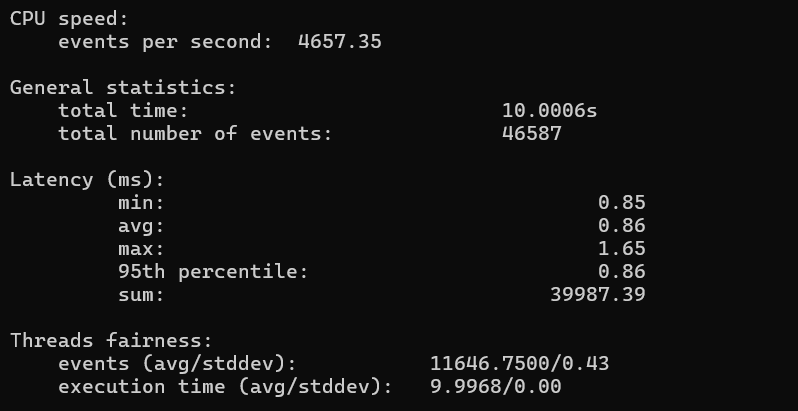
Calculations happen immediately when physical cores do the work without a hypervisor layer in the middle. The average latency was only 0.86ms.
However, VPS hosting showed that it was surprisingly capable. Hostinger’s VPS managed over 1,600 events every second. Zynoo’s virtual private server came next with over 1,400 events.
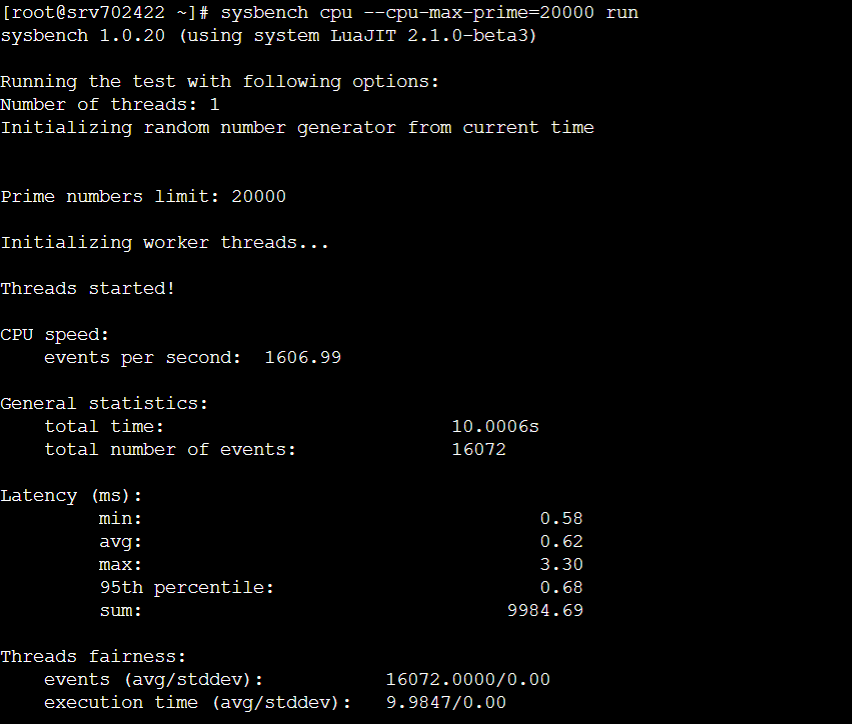
Let’s see why these calculations are important:
VPS servers are fast enough for a standard business site. They are extremely fast for WordPress or Magento.
However, the dedicated server is best for handling data science or crypto mining. It provides the raw computer capacity needed for even a massive game server.
Dedicated server stability also stood out. The VPS plans sometimes varied. This happened due to the “noisy neighbor” effect on the same physical server. In contrast, dedicated hardware delivered a predictable performance line.

Namecheap
Round 2: Memory Speed and Throughput
People often overlook the crucial RAM speed. But it determines your server’s ability to access temporary data fast. Fast RAM makes caching and database queries faster.
The Zynoo VPS stood out from dedicated servers for the memory benchmarks.
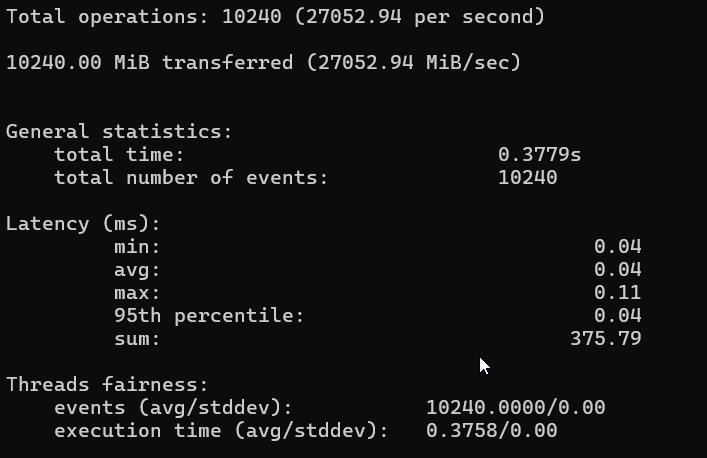
It has a throughput of about 27 GB per second. This value was higher than expected. HostArmada’s VPS also hit over 20 GB per second.
Zynoo dedicated server was a bit slower with 21 GB/s memory throughput.
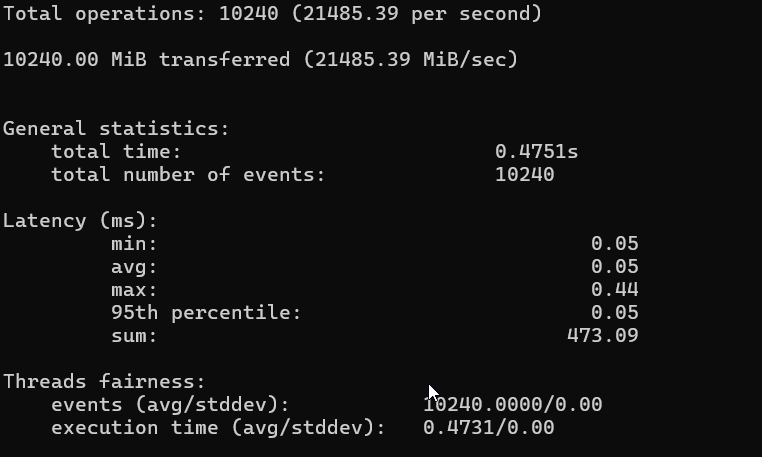
Let’s see what makes this result possible: Everything depends on the underlying hardware. VPS providers keep upgrading their huge parent nodes.
They do this with the latest RAM technology (like DDR5) to work for multiple users. A dedicated server on a budget may run with older DDR4 RAM.
This shows that a physical machine can be slower than a virtual machine. A high-performance VPS hosting plan offers speed for applications that depend on in-memory caching. For example, Redis and Memcached.
Round 3: Storage Performance (Disk I/O)
The storage is just as important as the CPU. A major problem in the modern web is reading and writing data to the disk. Our test covered read and write speeds to see which treats data best.
Dedicated servers with NVMe drives showed they are better in read speeds. The DediSTART server pulled data from the disk at a speed of 4.9 GB per second.
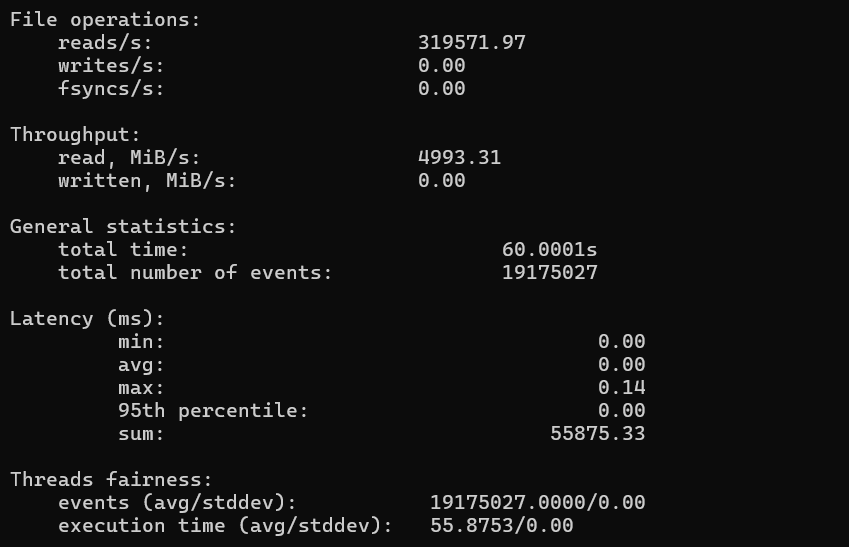
Next was Sharktech’s dedicated server with 4.2 GB per second.
This result shows the power of having direct access to the PCIe bus. You can read massive databases immediately by using dedicated resources for storage.
This attribute makes dedicated hosting perfect for heavy database applications or file servers.
In comparison, VPS solutions were a little slower. Hostinger’s NVMe storage reads at 1.7 GB per second. This speed is faster than usual for shared hosting. However, it is not up to half the speed of the dedicated hardware.
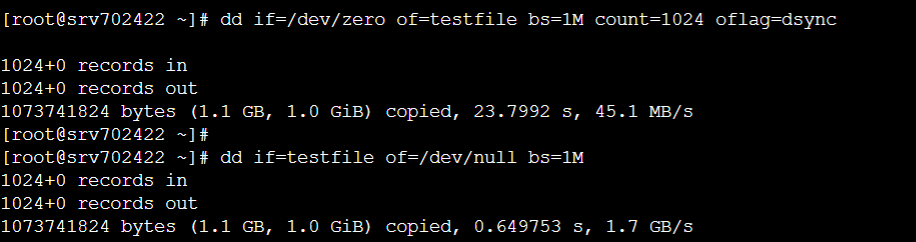
The same thing happened with write speeds. The Sharktech server can keep writing data at 1.0 GB per second.
Most VPS hosting plans put energy into write speeds. This helps to prevent one user from occupying all the disk space.
You will feel the difference when using an application that writes a lot of logs. Same with one that processes file uploads. Dedicated server’s write performance has no limit.
Round 4: Network Bandwidth and Connectivity
A fast server has no value without a smooth internet connection. Bandwidth is the link that allows users to see your content.
This category showed that dedicated servers have an amazing internet connection. The Sharktech dedicated server used a 10 Gbps connection.

It got download and upload speeds of over 9,000 Mbps in our tests. That is a lot of data. You can even stream 4K video to many people at once without buffering.
In contrast, most VPS plans have a 1 Gbps port. They often share this with other virtual servers. Zynoo’s VPS was able to hit over 900 Mbps.
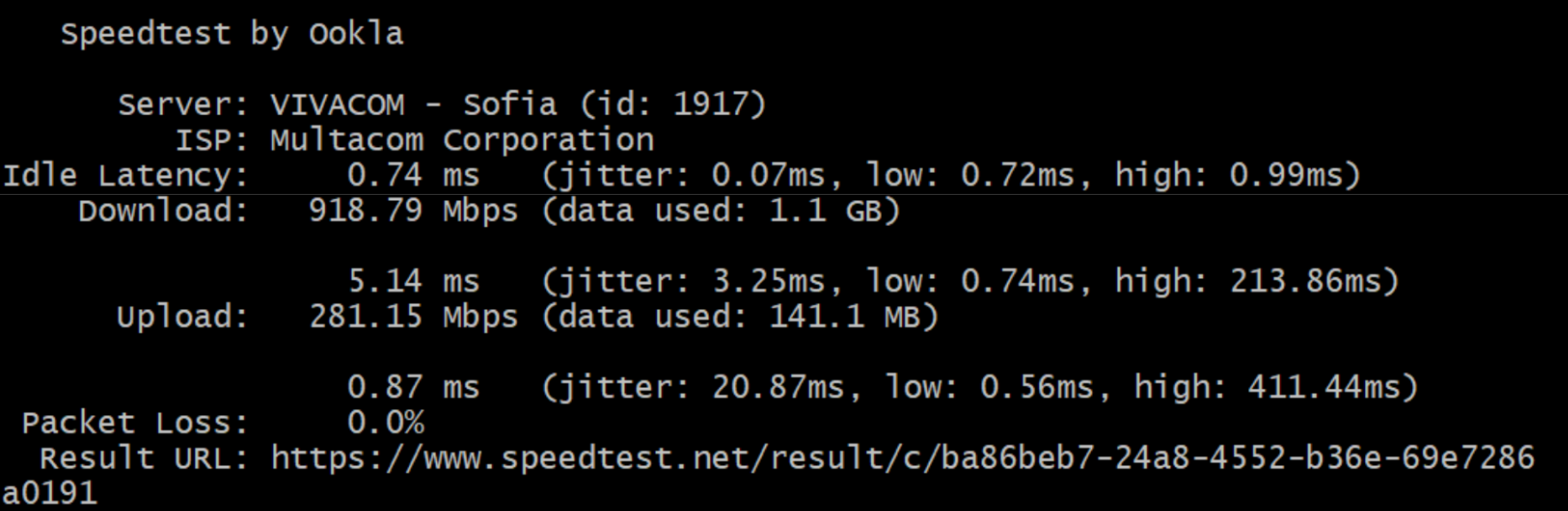
This was good for a VPS. But it is not in the same category as the dedicated environments. These monsters can offer up to 10 Gbps or unmetered bandwidth.
This network connection determines how gaming servers or huge e-commerce sites function. Dedicated servers provide the heavy connection for high-traffic operations.
Consistency and The “Noisy Neighbor” Effect
One of the key differences to check for VPS vs dedicated server performance is consistency.
A VPS functions with shared resources. You and multiple websites share the server resources. This means your performance may suffer if another user on the same server suddenly gets more traffic. This situation is the “noisy neighbor” effect.
Our latency tests confirmed that VPS solutions showed a little more variance in ping times.
Dedicated servers offer isolation, keeping your latency flat and stable 24/7. This stability is worth the effort used in processing sensitive data. It also benefits you in real-time trading, where every millisecond counts.
Management and Ease of Use
You are responsible for managing dedicated servers. The server gives you root access and a blank slate. You not only get complete control, but maintaining the entire server falls on you.
This means that you need technical knowledge to install custom software and the operating system. You must also configure the firewall and patch security holes.
You can often get managed services from VPS providers. Integrated platform management tools allow you to maintain the server. Tools like SolusVM make rebooting your server, reinstalling the OS, or monitoring usage easier.

A managed virtual server is safer to handle for anyone who is not a Linux expert. It gives you the power of a dedicated server and the ease of a VPS.
Scalability and Flexibility
Dedicated server hosting leads with raw speed. But VPS hosting is more flexible.
You have to scale resources on a dedicated server manually. This often involves powering down the machine and opening the case. Then, you will physically install more RAM.
Another method is to rent a larger single server and move all your data. In contrast, upgrading happens immediately in a scalable environment like a VPS.
You can double your RAM or CPU cores immediately by clicking a button in your dashboard. This makes this option perfect for fast-growing small and medium businesses.
You can start small to avoid spending too much on the VPS cost. Then, you expand as your business priorities and needs change.

Cost vs. Performance Analysis
The dedicated hosting is almost always higher than the VPS cost.
$10 to $50 a month can get you a high-performance VPS that can handle a large amount of traffic.
This is the part where Hostinger and HostArmada offer incredible value. They provide NVMe storage, fast RAM, and decent CPU power at an affordable price.

Dedicated servers are often higher, costing $50 to $100+ per month. However, this option is more cost-effective for large-scale operations. Buying a huge VPS might cost more than renting a dedicated server.
You must check how this cost efficiency suits your performance needs. Most websites can still function with shared hosting or a small VPS.
Security and Isolation
Any site handling sensitive data needs maximum server security.
There is a theory that the virtual environment makes machines vulnerable. It posits that one virtual machine can access the memory of another on the same physical machine.
Dedicated servers don’t have this risk because no other tenant uses the physical hardware. The physical isolation in dedicated environments is perfect for medical records (HIPAA) or credit card data (PCI-DSS). This makes it a top choice for auditors.
However, VPS providers keep working to improve security. Modern hypervisors are extra safe for 99.9% of users.
The table below outlines the key testing parameters for both hosting solutions:
| Metric | Best Dedicated Result | Best VPS Result | Winner |
| CPU Events/Sec | 4,657 (DediSTART) | 1,606 (Hostinger) | Dedicated |
| Memory Throughput | 21,485 MiB/s (Zynoo) | 27,052 MiB/s (Zynoo) | VPS |
| Disk Read Speed | 4.9 GB/s (DediSTART) | 1.7 GB/s (Hostinger) | Dedicated |
| Disk Write Speed | 1.0 GB/s (Sharktech) | 52 MB/s (Zynoo) | Dedicated |
| Network Download | 9,252 Mbps (Sharktech) | 918 Mbps (Zynoo) | Dedicated |
| Network Latency | 0.56 ms (DediSTART) | 0.74 ms (Zynoo) | Dedicated |
The Future: Cloud Hosting and VDS
A VDS offers dedicated resources inside a virtualized container. This results in the same performance as a physical server with the VPS management tools.
We confirmed that Zynoo’s VPS acted almost like a VDS. This performance was due to its high resource allocation. Choosing the right hosting solution between dedicated hosting and VPS can be hard.
Instead, find VPS plans that offer “dedicated vCPU.” You can also try VPS and dedicated hybrid solutions. A VPS vs VDS comparison to show that hybrid options bridge the gap.
Comparing Operating Systems
Every server needs an operating system. The good thing is that both hosting options support nearly all operating systems. Most web servers support Linux (Ubuntu, CentOS, Debian).
Both options have Windows Server. But its higher resource overhead makes it run smoother on dedicated hardware.

Dedicated servers make it easier to install custom kernels. You can even create your own VPS with virtualization hypervisors like Proxmox. These kernel modifications are not possible on a standard VPS.
Why Dedicated Resources Matter for Databases
The most bulky part of many web applications is the databases. They need a lot of RAM and quick disk access.
We confirmed that dedicated servers with NVMe drives offer superior random I/O performance. The dedicated server executes queries faster for databases with millions of records.
The high memory throughput of the VPS is great. However, the database will lock up if the disk cannot handle the writes. The VPS solutions we tested are enough for simple read-heavy databases.
Final Recommendation
The best way to get the perfect hosting solution is to buy only what you need. You can upgrade if you are using shared hosting and it is slow. This upgrade will give your performance a great boost.
You should only upgrade your VPS to dedicated hosting if your data shows you need it. This means your VPS is reaching RAM limits, or if your disk I/O is affecting your app. To get more insights, read our comparison of shared, dedicated, cloud and VPS hosting services.
When to Choose a VPS
Choose a virtual private server to:
- Run a blog, portfolio, or small business site.
- Get root access to install custom software without an entire physical server.
- Grow into a highly scalable environment.
- Get a price that suits your budget.
- Set up quick testing environments for development.
When to Choose a Dedicated Server
Choose a dedicated server to:
- Run a high-traffic e-commerce store like WooCommerce.
- Host gaming servers like Minecraft, needing high single-core clock speeds.
- Host a massive database with heavy I/O requirements.
- Process sensitive data with optimum isolation.
- Get 10 Gbps network connection speeds.
- Remove all “noisy neighbor” risks.
Data Summary: The Performance Matrix
The following table puts the peak performance metrics we observed together:
| Metric | Best Dedicated Result | Best VPS Result | Winner |
| CPU Events/Sec | 4,657 (DediSTART) | 1,606 (Hostinger) | Dedicated |
| Memory Throughput | 21,485 MiB/s (Zynoo) | 27,052 MiB/s (Zynoo) | VPS |
| Disk Read Speed | 4.9 GB/s (DediSTART) | 1.7 GB/s (Hostinger) | Dedicated |
| Disk Write Speed | 1.0 GB/s (Sharktech) | 52 MB/s (Zynoo) | Dedicated |
| Network Download | 9,252 Mbps (Sharktech) | 918 Mbps (Zynoo) | Dedicated |
| Network Latency | 0.56 ms (DediSTART) | 0.74 ms (Zynoo) | Dedicated |
Setting Up Your Online Presence
Choosing the right solution is only half of the journey. You still need to create a website to enjoy the benefits.
You can complete this journey with simple website builders like Hostinger and IONOS. These options offer user-friendly tools and templates to help you build a site by yourself.
You can also combine WordPress with the best VPS hosting to satisfy more complex needs. This enables you to create a secure and high-performing online presence.
Conclusion
Testing VPS vs dedicated server performance shows that speed is the new focus. It confirms that modern VPS can provide the same memory speed as dedicated hosting. But it can do the same heavy lifting. With this information, you should be able to choose a web hosting company.

Next Steps: What Now?
Follow these steps to choose a server with good performance:
- Create a professional website.
- Start with a basic hosting solution.
- Check whether your website is slow.
- Evaluate the volume of traffic you get.
- Set expansion goals for the site.
- Upgrade or migrate based on what you notice.
Further Reading & Useful Resources
Here are more resources for you:
- Best VPS Providers: Check out these top VPS hosting services.
- Website Performance Monitoring: Keep tracking your site performance to upgrade.
- Windows Dedicated Servers: Explore these top Windows dedicated hosting.
- Increasing Website Speed: Learn how to make your website faster.
- Upgrading for the Season: Understand why you need to upgrade your website for the holidays.


