When I first explored Z.com Hosting, what stood out immediately was its mix of affordability and essential features. With free domain registration, SSL, automated backups, and cPanel access, it seemed like a practical choice for beginners and small businesses.
In this review, I’ll share my real experience using their platform, from setup to performance, so you can see if it’s the right fit for your website.
To give readers a clear and fair picture of Z.com Hosting, we use a rating methodology that evaluates every provider across the same core parameters. These categories cover the aspects that matter most to users, from affordability and functionality to speed, usability, and customer care.
You can read more about how we evaluate hosting brands on our methodology page.
Below is Z.com’s rating breakdown based on my hands-on experience:
| Parameter | Score | Explanation |
|---|---|---|
| Prices | 9.3 | Z.com offers very affordable entry-level plans starting at just $2.31/mo, with free domain and SSL included. This makes them highly competitive for budget-conscious users. |
| Features | 9.5 | The hosting comes with cPanel, Imunify360 security, automated backups, and WordPress toolkit. These features give both beginners and advanced users plenty of tools to work with. |
| Performance | 8.2 | My test site showed decent stability but slower-than-ideal server response. With caching enabled, speeds could improve significantly. |
| Ease of Use | 9.5 | Registration was simple, the client area intuitive, and cPanel access seamless. The layered approach (product page + full cPanel) works well for different user levels. |
| Support | 9.0 | Ticket responses were quick and helpful, and the knowledge base covered essentials. However, live chat availability is limited to office hours. |
| Overall | 9.1 | Z.com delivers strong value with affordable plans, robust features, and user-friendly tools. Performance could be better out of the box, but overall it’s a reliable choice. |
Z.com keeps things straightforward by focusing on four main hosting types:
What stood out to me right away is that all of these plans come with a 30-day full money-back guarantee. If you’re not happy, they’ll give you a full refund, though they’ll deduct the cost of the free domain if you cancel.
Still, that’s fair compared to many hosts that only offer partial refunds or none at all.
I also appreciate how flexible they are with payment methods. They accept Visa and Mastercard, PayPal (handy if you’re outside the Philippines), and Dragonpay, which opens up options like Gcash and ECPay for local users.
For those who prefer traditional banking, Metrobank transfers are also supported, though you’ll need to send proof of payment for verification. Having these multiple payment channels makes it much easier for users in different regions to sign up without hassle.
Overall, Z.com’s pricing is competitive, and the flexibility in payments combined with a genuine money-back guarantee, makes them one of the safer hosting providers to test.
Here’s how their 2026 hosting prices and plans break down:
Performance is one of the most important aspects of hosting. No matter how user-friendly the dashboard is, if your website is slow, visitors will leave.
To make this test realistic, I didn’t just spin up a blank WordPress site. Instead, I installed WordPress through cPanel, added images, plugins, and real content—everything you’d expect on a live website. My goal was to replicate an actual working site, not just test an empty installation.
I then ran a performance test on my site (host-test.shop) using GTmetrix with the test server located in Danville, VA, USA. Here are the results I got:
|
|

The Largest Contentful Paint (3.6s) also shows the site took a bit too long to render the main content on the page. For comparison, Google recommends keeping this under 2.5s for good performance.
That said, the Total Blocking Time of 0ms is excellent. It means the site wasn’t bogged down by render-blocking scripts, and once content started loading, it remained smooth.
The Structure score of 92% also shows that the site was well-optimized in terms of front-end setup, which is a good sign. Most of the performance bottleneck came from server response and LCP, not poor optimization.
From my test, Z.com’s performance is decent but not industry-leading. The site is usable, and the strong structure score suggests that with some caching and optimization (LiteSpeed Cache, Cloudflare, or a CDN), you could significantly improve loading speeds.
What I liked is that Z.com includes tools like LiteSpeed Web Cache Manager and Imunify360 in cPanel, which can help improve performance and stability if configured correctly.
Out of the box, though, I’d say their hosting leans more towards “good enough for small personal or business sites” rather than blazing-fast enterprise-level hosting.
Customer support is one of the most important aspects of any hosting provider. Even if a service has great features, you’ll eventually run into issues that require human assistance or clear documentation.
That’s why I decided to take a close look at how Z.com handles support.
They mainly offer two channels: ticket support and a knowledge base. I tested both to see how reliable and helpful they actually are.
To access the ticket system, I went to the top main menu in my dashboard, clicked Support, and chose Tickets from the dropdown.

On the ticket page, I could see “My Support Tickets” (my ticket history) and an option to create a new one. At the bottom left menu, I clicked Open Ticket.

The system immediately prompted me with a message: “If you can’t find a solution to your problems in our knowledgebase, you can submit a ticket by selecting the appropriate department below.” It also mentioned that for urgent issues, live chat is available Monday to Friday from 9am to 6pm.
The departments available included Sales, Web Hosting, Domain, Google Workspace, and Customer Service. I chose Web Hosting since my question was technical.

The form asked for a Subject, Department, Related Service, Priority, and my Message. There was also the option to attach files (jpg, gif, png, txt, pdf). I set the priority to Medium, filled in my details, and clicked Submit.
At 18:26, I submitted a question:
“Hello. We’re doing a review of your web hosting service, and we’ll need an active hosting plan in order to start the review. We’ll also need a domain name in order to build a real website and test it. Thanks!”
By 18:33, I received a response, just 7 minutes later. The reply was polite and practical: they explained that I could purchase the cheapest available domain, which would automatically come with free hosting included. That way, I could test their services without needing a separate hosting plan.

I was impressed by the speed of the response—7 minutes is excellent for a ticket system. The reply was clear, professional, and directly addressed my question. While I would have liked to see live chat available 24/7, the quick turnaround shows their team is attentive during working hours.
I also tested the knowledge base, which I accessed from the same Support menu.
Clicking Knowledge Base took me to a page with a search bar at the top, category listings, and a section for Most Popular Articles.

The categories were divided into Domains (67 articles) and Web Hosting (25 articles). Popular articles included:
I liked that the articles were straightforward and to the point, often including clear step-by-step paths (like account >> Domains >> Settings). The search function made it easy to type a question and find relevant articles quickly.
The layout itself was clean and simple, with a left-side menu giving access to tickets, announcements, and the knowledge base.
My take on the knowledge base: I found it functional but basic. It covers essential topics well, especially for new users dealing with domains, DNS, and email setup. However, the collection could be expanded with more advanced tutorials like detailed guides on optimizing performance with LiteSpeed or securing sites with Imunify360.
From my experience, Z.com’s support feels reliable and responsive. The ticket system worked well and delivered a fast, relevant reply, while the knowledge base is good for beginners who need straightforward answers.
That said, I think there’s room for improvement in two areas: expanding the documentation to include more advanced hosting tasks and offering longer hours for live chat.
Still, my overall impression is positive. Z.com doesn’t leave you stranded when you need help, and they back their services with a support team that responds quickly.
I decided to evaluate the ease of use of Z.com Hosting by focusing on three key areas: the registration process, the dashboard interface, and hosting management.
These are the areas that matter most because they shape your first impression of the platform and determine how smoothly you can manage your hosting day to day.
I started by testing the registration process myself, and here’s exactly how it went step by step.
First, I went to the main Z.com Hosting page and clicked on the “Buy Web Hosting” button.

This brought me to a page that displayed all the hosting plans clearly: Single, Starter, Personal, and Business. I wanted something with more flexibility, so I chose the Personal plan. It stood out because it included 50 GB SSD storage, unlimited websites, unlimited email and databases, and unmetered bandwidth, which felt like the right balance of price and features. So, I clicked “Buy Now.”

The next page asked me about the domain. I had two options: register a new domain or use an existing one. Since I already had my own domain, I selected the “I already have a Domain” option, typed in my domain name, and clicked “Check.” The system quickly verified it, and I was able to proceed.

Then came the Sign Up / Sign In page. Because I was a new customer, I clicked the “New Customer” button and filled in the registration form: my email, password, first and last name, phone number, and address details. It was straightforward, but at this point, I did notice that Z.com asks for quite a bit of personal information. While I understood it was for billing and verification purposes, a small note explaining why each detail is needed would make the process more transparent for first-time users.

Once I submitted my details, I had to go through email verification. A pop-up told me a security code had been sent to my email. I opened my inbox, copied the code, and entered it in the field before clicking “Verify Now.”

After verifying my email, I landed on the checkout page. This was step 4 of the process, clearly labeled at the top as part of a 5-step flow (Plan, Domain, Sign Up/Sign In, Checkout, Complete). The structure made it very easy to know exactly where I was. I entered my card details to complete the purchase, clicked “Submit and Continue,” and within a few seconds, the payment went through.
Finally, I received a confirmation email from Z.com that summarized my order and confirmed that my hosting account was active. That wrapped up the sign-up in a neat and reassuring way.
Overall, I found the registration process to be clear, logical, and secure. Each page had a single purpose, which avoided confusion, and the step-by-step layout with progress markers at the top really helped me understand where I was in the journey.
What I liked:
What could improve:
From this first experience, Z.com came across as a user-friendly and trustworthy provider. The process wasn’t overwhelming, and I didn’t feel lost at any point.
After signing up, the next thing I wanted to evaluate was the client area, or dashboard, because this is where you spend most of your time once you’re a customer.
A well-designed dashboard saves you from wasting time digging through menus.
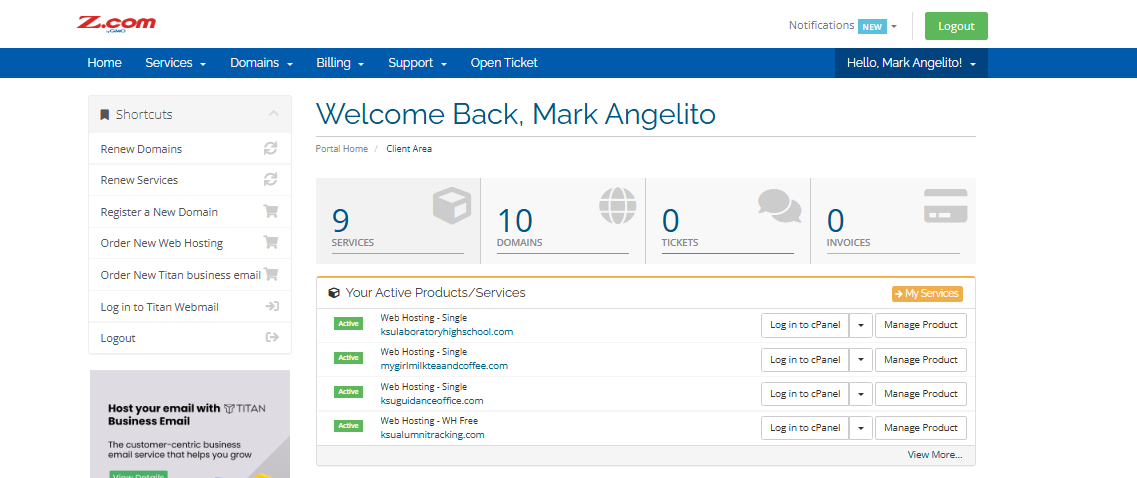
When I logged in, I was greeted with a friendly “Welcome Back” message. The overall layout looked clean and organized, with sections that felt purposeful instead of cluttered.

On the left-hand side, there’s a Shortcuts menu, and I found this particularly practical. It included links like Renew Domains, Renew Services, Register a New Domain, Order New Web Hosting, Order New Titan Business Email, Log in to Titan Webmail, and of course, Logout.
Having these shortcuts right at the top meant I didn’t have to hunt through different pages just to perform the most common actions. Below this menu, there was a subtle promotional banner for Titan Business Email.
While it’s clearly an upsell, I didn’t find it intrusive. It actually made sense in the context of the dashboard.
The center of the dashboard gave me a neat summary of my account. Right at the top were four large metrics: 2 Services, 1 Domain, 2 Tickets, and 0 Invoices. I liked this because, at a glance, I could see exactly what was happening with my account—no digging required.
Below that, the Active Products/Services section listed my current subscriptions: Web Hosting – Free and Email Hosting – Titan Business Email Trial. Each service had clear buttons for Log in to cPanel, Log in to Titan Webmail, and Manage Product. These direct links made it incredibly easy to jump straight into managing my hosting or email.
Scrolling down, I noticed a Services Renewing Soon section. This is something I really appreciate, because missed renewals can cause downtime. Seeing a proactive reminder with a Renew Now button makes it simple to take action before it’s too late.
On the right-hand side, the Recent Support Tickets section displayed my open and answered tickets. For example, I could see ticket #10-09-2025-1476 – Configure LiteSpeed Cache marked as Open and another marked as Answered.
This gave me a clear idea of my ongoing support interactions without needing to search. There was also an Open New Ticket button placed prominently, so starting a new request was just one click away.
At the very bottom right, I saw the Recent News section. This is where Z.com posts updates like server maintenance schedules or new feature announcements. It’s a small addition but an important one, as it keeps customers informed about changes that might affect their websites.

I found Z.com’s client area to be very well thought out. It struck the right balance between providing a high-level overview and giving me quick access to the details when I needed them.
What I liked:
Where it could improve:
Based on my time in the client area, I came away with the impression that Z.com Hosting has put real thought into user experience. The dashboard is functional and designed to make managing hosting as straightforward as possible.
Next, I wanted to see how easy it would be to manage my hosting inside Z.com Hosting. This part is critical because once you’re set up, the real work begins—configuring your server, creating email accounts, uploading files, and keeping an eye on resource usage.
If hosting management is clunky or confusing, it slows down even simple tasks.
From my client area, under “Your Active Products/Services,” I saw my hosting package listed with two options: “Log in to cPanel” and “Manage Product.” I first clicked “Manage Product” because I wanted to see what kind of tools Z.com offered directly within their own system before jumping into cPanel.

That click took me to a dedicated page for my domain host-test.shop. At the top, it was clearly labeled Portal Home > Client Area > My Products & Services > Product Details, so I knew exactly where I was.

On the left-hand side, there was an Actions menu with links like Log in to cPanel, Log in to Webmail, Change Password, Upgrade/Downgrade, and Renew Service. I liked this right away. It gave me the essentials without forcing me to dig through menus.
In the main section of the page, I found a few different panels:
What impressed me at this stage was the range of tools Z.com puts at your disposal. From the client area alone, you already get shortcuts for email, databases, backups, and domains.
However, I wanted to see how much control I’d really have if I explored deeper. To test the full management experience, I clicked “Log in to cPanel.”

The login was instant—no extra steps, no password prompts—which made the integration feel seamless.
Inside cPanel, I was greeted with the full industry-standard toolkit, neatly organized into categories like Files, Databases, Domains, Email, Metrics, Security, Software, and more.
The sheer number of tools available gave me full control over everything from files and email to performance optimization. I liked that Z.com didn’t limit or strip down their cPanel. They gave me the complete set of tools.

I found hosting management with Z.com to be comprehensive and thoughtfully layered. The Manage Product page gives you a simplified view for everyday tasks, while cPanel provides the full professional toolkit.
What I liked:
Where it could improve:
Based on hosting management, Z.com proved itself to be reliable and user-focused. They give beginners the tools to handle the basics while still offering advanced users full control through cPanel. For me, this balance shows that Z.com understands the different types of customers they serve and has built an environment that works for both.
From my experience, I can say Z.com Hosting is a solid choice if you’re looking for affordability paired with essential hosting features. I liked how smooth the registration was, the clean client area, and the layered hosting management that combines quick shortcuts with full cPanel access.
Performance wasn’t the fastest out of the box, but with optimization tools like LiteSpeed and caching, you can get much better results. Support impressed me with quick ticket responses, though live chat hours are limited.
Overall, Z.com strikes me as a reliable, user-friendly provider that offers excellent value for money, especially for beginners and small to medium websites.


| Plan Name | Warranty | Price | |
|---|---|---|---|
| Personal Email | £0.00 | £2.96 | Details |
| Google Workspace | £0.00 | £4.98 | Details |
Currently, Z.com primarily focuses on shared, WordPress, cPanel, and email hosting. VPS and dedicated hosting options are not available at this time.
Yes, but only on higher-tier plans like Starter, Personal, or Business. The entry-level Single plan supports just one website.
Z.com provides domain privacy protection for qualifying domains, helping to protect your personal information from being exposed in the WHOIS database.
Yes, Z.com accepts global payments through PayPal and major credit cards, though some local payment methods (like Metrobank transfers) are limited to the Philippines.
Yes, you can migrate your existing website to Z.com. Migration isn’t automated, but you can use cPanel tools or request assistance from their support team.

Answer a few simple questions and find the perfect solution for you!
Start Hosting Search