




- 30-Day Money-back Guarantee
- Free Еmail, SSL, CDN and Backups
- Support available 24/7/365 via Phone, Chat, Tickets and Knowledge Base


- 30 Day Refund Policy
- Free domain, Free site transfers, Free SSL certificate
- Support available 24/7/365 via Phone, Chat, Tweet, Knowledge Base
SiteGround vs HostGator: Quick Summary
Both HostGator and SiteGround offer reliable hosting with free SSL, daily backups, and unmetered bandwidth, but they serve different users.
HostGator is ideal for beginners or budget-conscious users, with low starting prices, user-friendly cPanel, and generous storage across shared, VPS, and dedicated plans.
Extras like a website builder, Cloudflare CDN, and basic security tools make it a flexible choice for growing sites.
SiteGround performs well in advanced security, WordPress-focused features, and fast global delivery through multiple server locations.
Its custom Site Tools control panel, daily backups, and strong support suit users who prioritize speed, reliability, and protection.
Overall, HostGator wins for affordability, performance, and ease of use, while SiteGround is best for those focused on security and WordPress expertise.
SiteGround vs HostGator: Overview
Before diving into the nitty-gritty details, let’s get to know our contenders. SiteGround and HostGator are two heavyweights in the hosting world, each with its strengths and styles.
SiteGround Profile
SiteGround is a web hosting provider based in Sofia, Bulgaria, and has been around since 2004. It offers domain registration, email hosting, shared and cloud hosting, plus corporate solutions and cloud computing.
Along with affordable pricing, SiteGround is known for its reliable customer support and strong technical features.
HostGator Profile
HostGator is a leading provider of shared, reseller, VPS, and dedicated web hosting. Founded in 2002, the company is headquartered in Houston, Texas.
For anyone new to VPS hosting, HostGator offers a beginner-friendly option with optional cPanel support. Its affordable plans and free website builder make it easy to get a site up and running.
1. Hosting Features and Services Comparison
Now that we’ve met the hosts, let’s see what they actually bring to the table in terms of features and services.
SiteGround Features
SiteGround offers up to 40 GB of disk space on shared and managed WordPress hosting, and up to 160 GB on cloud hosting.
You get unlimited bandwidth on all shared and WordPress plans, and up to 5 TB on cloud hosting.
SiteGround includes free daily backups and restores, free WordPress installation and site migration, plus an easy-to-use Weebly website builder.
SiteGround also gives you a free domain, SSL certificate, and Cloudflare CDN to improve your site’s security and speed right from the start.
SiteGround is a great choice for users who want to enjoy WordPress’s flexibility and power without needing advanced technical skills.
HostGator Features
HostGator offers plenty of space, with up to 100 GB on shared hosting, 450 GB on VPS, and a massive 3 TB on dedicated hosting.
All plans come with unmetered bandwidth, so you can grow your site without worrying about limits.
Managing and securing your website is easy thanks to free daily backups and restores, free WordPress installation, and complimentary site migration.
Plus, HostGator includes a free website builder, which allows for easy creation and customization of websites.
With malware scanning and Cloudflare CDN included, HostGator shows it takes website security and performance seriously.
2. Prices and Plans Comparison
Let’s talk about the part everyone wants to know: how much is this going to cost, and what do you get for your money?
Shared Hosting Plans Comparison
SiteGround Shared Hosting Plans
SiteGround’s shared and WordPress hosting plans start at $3.99/month for a single site. Higher-tier plans offer more storage, support for unlimited sites, and extra resources to help you scale while keeping performance and security strong.
HostGator Shared Hosting Plans
HostGator’s shared hosting starts at $2.75/month for one website and includes a free domain and SSL for the first year.
Higher-tier plans give you more websites, extra storage, and added features like malware scanning and Cloudflare CDN, which makes them a solid option for growing businesses.
HostGator DEALS - Grab Your Discounts Today!
Managed WordPress Hosting Comparison
HostGator’s managed WordPress hosting starts at $3.50/month, supporting up to 20 websites with 20GB of storage. Higher-tier plans let you host more sites, offer more storage, and add features like daily backups, domain privacy, and better performance.
All plans come with WordPress pre-installed, Cloudflare CDN, malware scanning, and a 30-day money-back guarantee.
SiteGround’s managed WordPress plans are identical to its shared hosting plans.
Reseller Hosting Plans Comparison
SiteGround Reseller Plans
SiteGround’s reseller hosting starts at $6.99/month with support for unlimited websites, daily backups, and strong security.
Higher-tier plans offer more storage and advanced tools, while the Cloud plan delivers powerful resources for demanding projects.
All plans include developer-friendly features and reliable performance.
HostGator Reseller Plans
HostGator’s reseller hosting starts at $34.99/month with 4 GB RAM and 100 GB storage, plus free site migration for new users.
Higher-tier plans offer more RAM and storage, which makes them a good fit for resellers with growing client bases. All plans include unmetered bandwidth for smooth scaling.
3. Website Performance Comparison (Uptime & Speed)
Features are great, but if your site is slow or offline, none of that matters. Here’s how each host performs under the microscope.
SiteGround Uptime & Speed
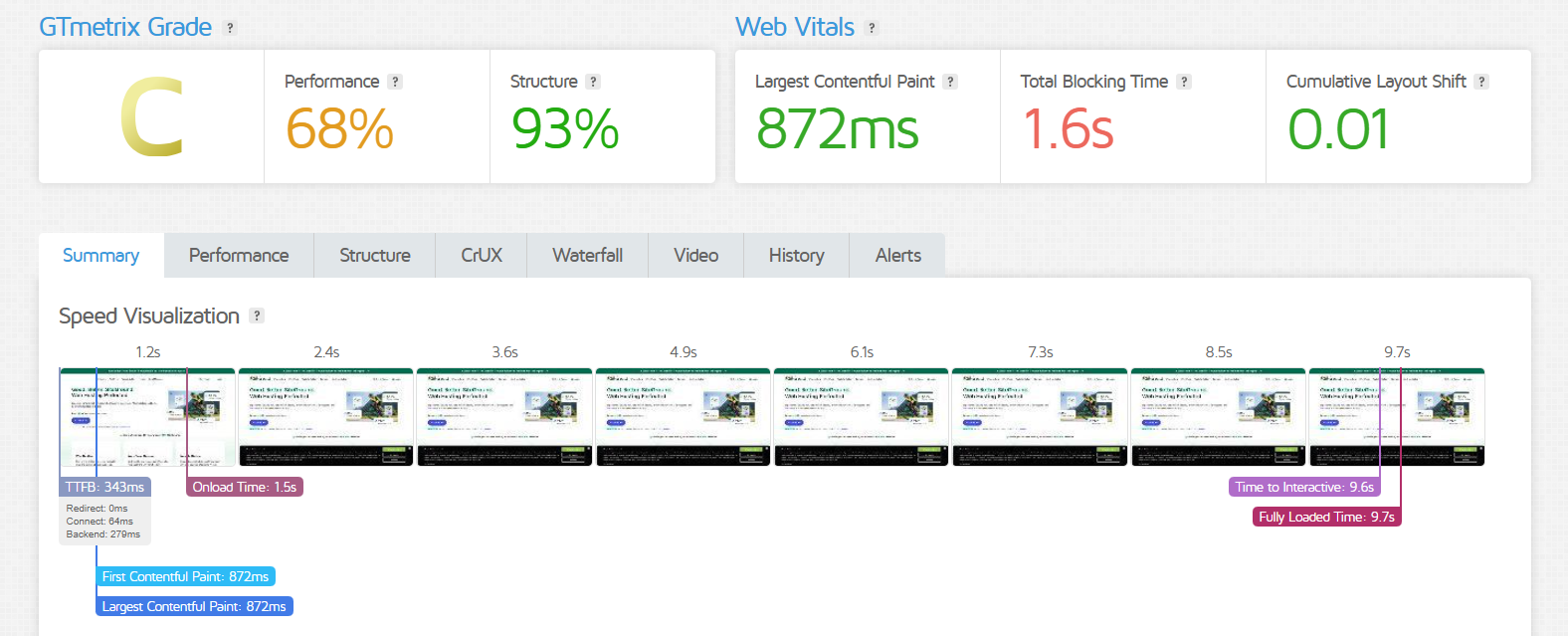
The GTmetrix report shows a decent C grade, mostly due to a performance score of 68%, while the structure score is a solid 93%. Key content loads fast (LCP at 872ms) and the layout stays stable (CLS at 0.01), which is great for user experience.
The biggest slowdown comes from scripts, with a Total Blocking Time of 1.6s and a fully loaded time of 9.7s, which means users wait longer before they can fully interact with the page.
SiteGround delivers an impressive uptime of 99.9%, so you can count on your site staying online without interruptions.
HostGator Uptime & Speed
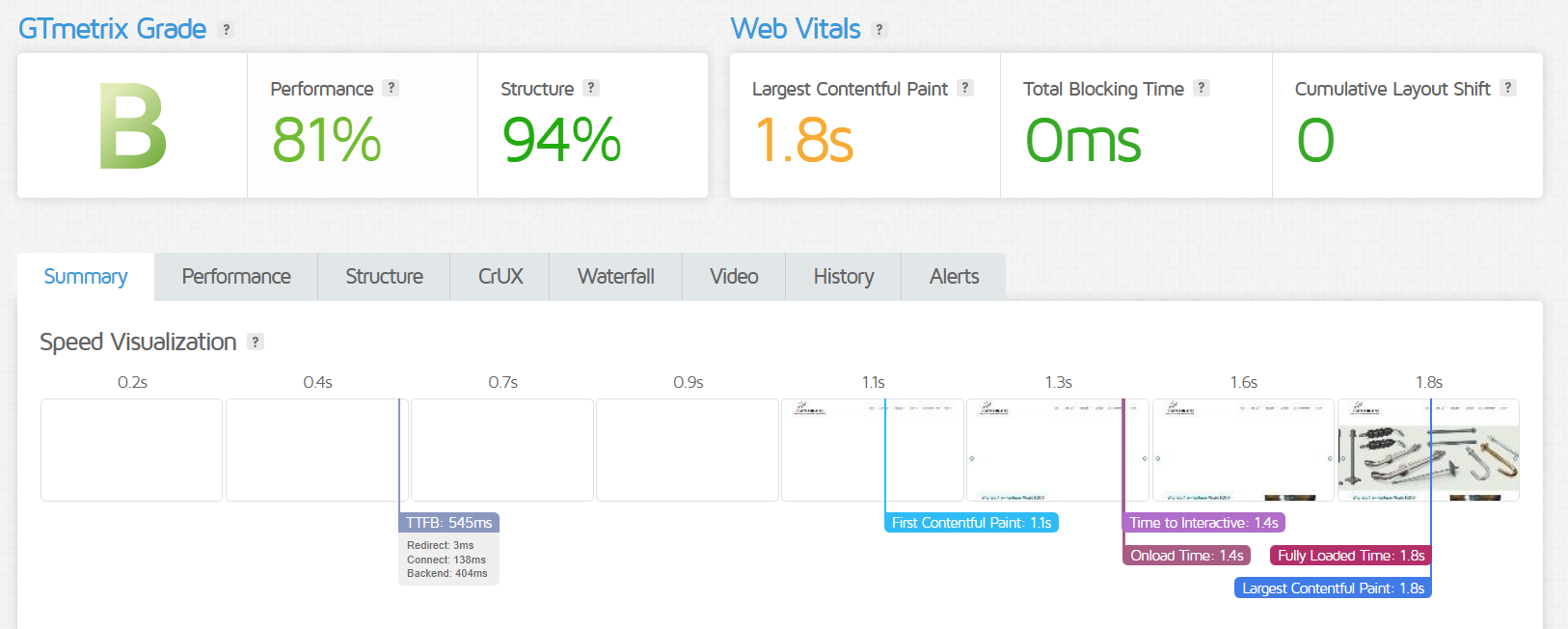
This GTmetrix report shows solid overall performance with a B grade, backed by an 81% performance score and a strong 94% structure score. The Largest Contentful Paint sits at 1.8s, which is right on the edge of the ideal range, and both Total Blocking Time (0ms) and Cumulative Layout Shift (0) are excellent.
The site becomes fully interactive by 1.4s and finishes loading by 1.8s, which makes it a fast and stable experience for users.
You can count on reliable performance with a solid 99.9% uptime, so your site stays up and running almost all the time.
4. Customer Support Comparison: Who’s Got Your Back?
Even the best websites face occasional issues. When that happens, who’s going to answer your call (or chat) for help?
SiteGround Customer Support
SiteGround has outstanding customer support options. There is 24/7 phone and live chat help, a knowledge base, automated solutions, and help desk tickets.
When you submit a support request, automated tools step in right away to help guide you.
You can also explore their knowledge base, which is packed with helpful articles, step-by-step guides, answers to common questions, and troubleshooting tips. It’s often the fastest way to get the help you need!

Live chat and phone support are perfect if you’re looking for quick, clear answers. You can ask as much or as little as you need, and both options are available 24/7.
For more complex issues, SiteGround’s ticketing system connects you with their top-level tech experts. It’s a great option for tackling more challenging problems, with fast response times, often within 15 minutes, and reliable fixes.

HostGator Customer Support
HostGator offers plenty of customer support options to help you sort out any issues.
Now let’s talk about SiteGround’s live chat. They’ve extended their support hours to 24/7, so you can chat with an agent anytime, even on weekends.
They also offer phone support around the clock, so you can get a quick response whenever you need it.

You can also use their knowledge base to find solutions to any questions you have.

HostGator also has an active presence on X. You can connect with other users in their forum to ask questions or share experiences. The HostGator community includes updates on events, news, discussion topics, Pro user groups, and even a section for inspiration.

Overall, HostGator’s customer service is solid. The only thing missing is email support and a few more video tutorials.
5. Ease of Use Comparison: Which Platform is Easier to Use?
You don’t need to be a tech wizard to set up a website, at least not with the right host. Let’s see which one makes things simpler.
SiteGround Ease of Use
SiteGround replaced cPanel with Site Tools, their own custom control panel. It’s designed to be user-friendly, even if you’ve never used one before.

Another great thing about SiteGround is that you don’t even need to open the control panel to install WordPress. Just follow the prompts, and you’re good to go.
From the main dashboard, you’ll see a suggestion to install WordPress. Or, you can go to the Websites section in the main menu and click New Website. That’ll launch the installation wizard.

HostGator Ease of Use
HostGator is a beginner-friendly web host with a simple interface and the familiar cPanel. It’s easy to access and use, though the design feels a bit outdated.
After logging in, you can head to your customer dashboard and manage all your tools and features from there.
Here is how cPanel looks like:

HostGator also makes WordPress easy to use. To install it, click the Install WordPress button on your dashboard and fill in the required details.
You’ll find the button right in the Control Panel section, so it’s quick to access and simple to set up.

6. Privacy and Security Comparison: Which Platform is More Secure?
Here’s how SiteGround and HostGator stack up in keeping your site safe.
SiteGround Security:
SiteGround’s plans include the following basic security features:
- Custom WAF(Web Application Firewall)
- AI anti-bot system
- Free SSL certificates
- A real-time server monitor
- Security plugin for WordPress
HostGator Security
HostGator’s security features are:
- Daily malware scan
- Automatic malware removal
- Scans unlimited web pages
- Basic CDN
- Weekly scan report
- Google Blacklist monitoring
- SiteLock seal
- Block automated bot attacks
7. Server Locations Comparison
Where your host keeps its servers can make a big difference in speed. Let’s map out where SiteGround and HostGator’s data centers live.
SiteGround Server Location
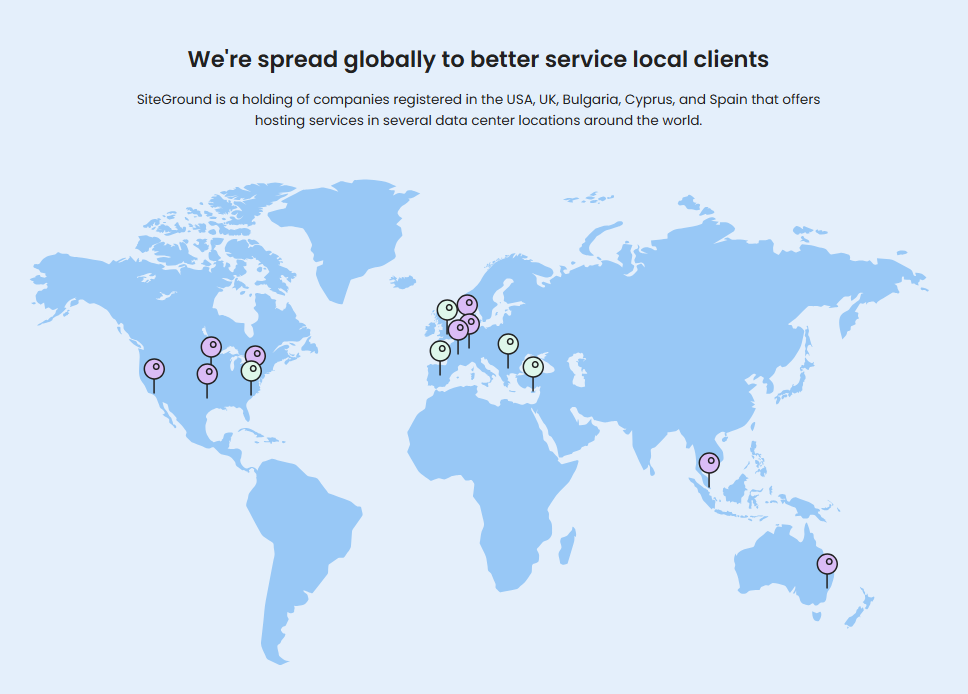
SiteGround’s servers are housed in six distinct data centers. They have headquarters in Iowa (USA), London (UK), Eemshaven (Netherlands), Frankfurt (DE), Sydney (AU), and Singapore.
This means your website loads faster by serving visitors from the location closest to them.
HostGator Server Location
HostGator currently hosts its servers in the U.S., mainly in Provo, Utah, and Atlanta, Georgia, with some in other locations too.
You can also enable Cloudflare, which delivers your content through an additional 23 data centers worldwide for faster loading.
SiteGround vs HostGator: Final Recommendations
Both SiteGround and HostGator offer strong hosting solutions, but your choice depends on your specific needs and priorities.
Why Choose HostGator?
HostGator is one of the biggest and most well-known domain registrars out there. It’s a good choice if:
- You want affordable hosting and do not need a lot of extra features. HostGator offers budget-friendly plans.
- You’re new to web hosting. HostGator is beginner-friendly and easy to use.
If these fit your needs, HostGator could be a solid option.
When to Choose SiteGround?
Although SiteGround topped our overall comparison, it works best if:
- You care about speed, security, and SEO.
- You want a user-friendly system that works well for both clients and teams.
- WordPress is your CMS of choice, and you’re looking for a host with real WordPress expertise.
- You want a reliable support team to help whenever something goes wrong with your site.
SiteGround and HostGator Alternatives
| Provider | Overview | Expert & User Reviews | |
|---|---|---|---|
 | Hostinger offers affordable shared hosting, VPS hosting, and cloud hosting, along with domain registration services. | Hostinger Review | Visit Hostinger |
 | HostArmada focuses on speed, security, and reliability and offers features like SSD storage, free website migration, daily backups, and a user-friendly control panel. | HostArmada Review | Visit HostArmada |
 | FastComet offers strong uptime, fast customer support, and a 45-day money-back guarantee. | FastComet Review | Visit FastComet |
The Bottom Line
The main reason for comparing HostGator and SiteGround was that both offer domain registration, and I wanted to see which one offers more overall. In general, HostGator comes out ahead.
You really can’t go wrong with either, but your needs might make one a better fit. Both offer a money-back guarantee, low first-year prices, and a free SSL certificate.
If fast site loading and eco-friendly servers matter most to you, go with SiteGround. If you need VPS hosting or a server that can handle all stages of your site’s growth, HostGator is the better choice.

